Building a Secure GraphQL API with Ory Kratos
Learn how to integrate Ory Kratos with a Flask-based GraphQL API for secure user authentication and session management.
Building a Secure GraphQL API with Ory Kratos
In this article, we'll walk through how to integrate Ory Kratos—a headless identity and authentication system—with a Flask-based GraphQL API. We'll cover user registration, login flows, session management, and discuss security best practices to ensure your application is both functional and secure.
A full working example is available here: wassimoo/ory-graphql
Prerequisites
Before we dive in, ensure you have the following:
- A running instance of Ory Kratos (preferably version 0.8.0 or later).
- Python 3.8+ installed.
- Basic understanding of Flask and GraphQL.
- Familiarity with Ory Kratos' self-service flows and session management.
What is Ory Kratos?
Ory Kratos is a cloud-native identity and user management system that provides a headless approach to authentication and authorization. Unlike traditional identity providers, Kratos doesn't come with a built-in UI—instead, it exposes APIs that allow you to build custom authentication flows that match your application's design.
Key features of Ory Kratos include:
- Self-Service Flows: Users can register, login, recover passwords, and manage their accounts through API-driven flows
- Session Management: Handles secure session creation, validation, and expiration
- Multi-Factor Authentication: Supports various authentication methods including passwords, TOTP, and more
- Identity Schemas: Flexible identity data models that you can customize for your needs
- API-First: Designed to be consumed by any frontend or backend technology
In this tutorial, we'll use Kratos to handle user registration and authentication for our GraphQL API, demonstrating how to integrate it with a Flask application.
Basic Python GraphQL API
First, let's set up a basic Flask application with GraphQL support using Ariadne:
Install dependencies:
pip install Flask ariadne
Create server.py with a basic GraphQL query:
from flask import Flask, request, jsonify
from ariadne import QueryType, make_executable_schema, graphql_sync
from ariadne.explorer import ExplorerPlayground

app = Flask(__name__)
query = QueryType()

# Basic "Hello World" Query
@query.field("hello")
def resolve_hello(*_):
    return "Hello, world!"

schema = make_executable_schema("""
type Query {
    hello: String!
}
""", query)

@app.route("/graphql", methods=["GET", "POST"])
def graphql_endpoint():
    if request.method == "GET":
        return ExplorerPlayground().html(request)
    success, result = graphql_sync(schema, request.get_json(), context_value=request)
    return jsonify(result)

if __name__ == "__main__":
    app.run(port=8000)
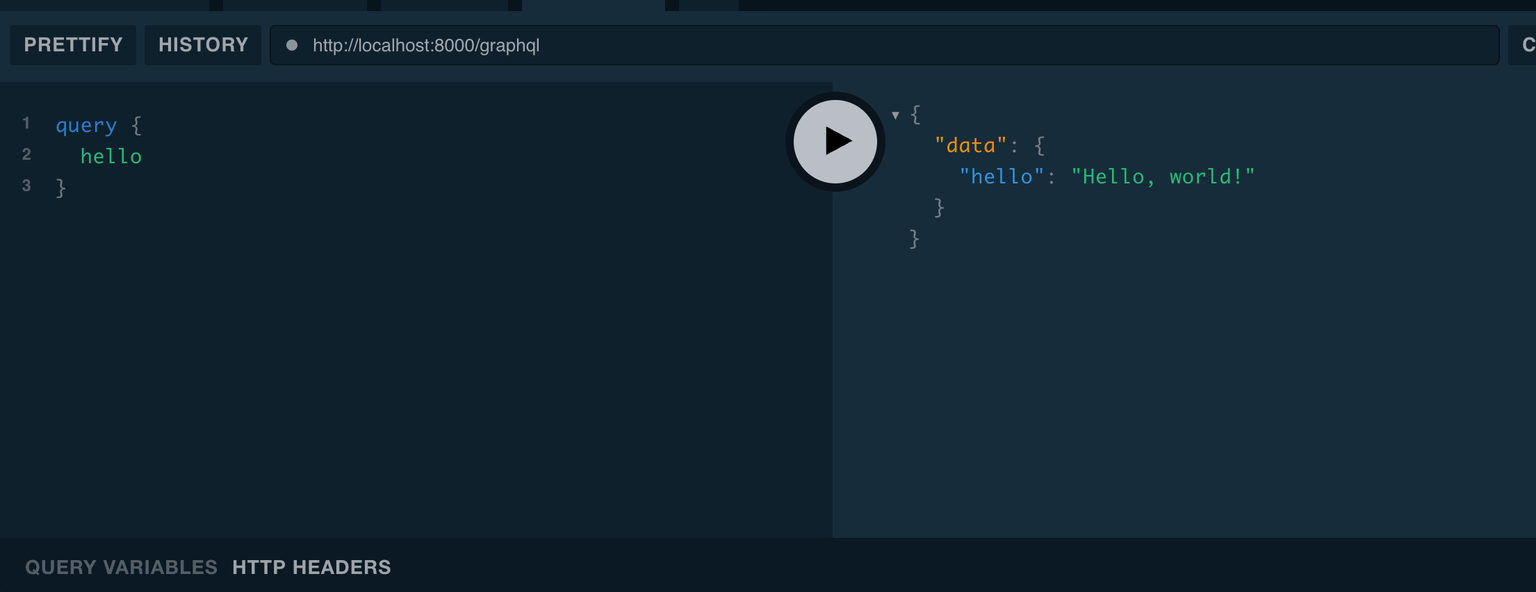
Test it by visiting http://localhost:8000/graphql and running:
query {
  hello
}
Setting Up Ory Kratos
Download and run Kratos with Docker:
Create docker-compose.yml:
version: '3.8'
services:
  kratos:
    image: oryd/kratos:v1.2.0
    command: serve -c /etc/config/kratos/kratos.yml --dev --watch-courier
    environment:
      - LOG_LEVEL=debug
      - DSN=memory
      - KRATOS_PUBLIC_URL=http://localhost:4433
      - KRATOS_ADMIN_URL=http://localhost:4434/admin
    ports:
      - '4433:4433'
      - '4434:4434'
    volumes:
      - ./kratos:/etc/config/kratos:ro
Create kratos/kratos.yml with minimal dev config:
log:
  level: debug

serve:
  public:
    base_url: http://localhost:4433/
  admin:
    base_url: http://localhost:4434/admin

selfservice:
  default_browser_return_url: http://localhost:4455/
  flows:
    login:
      ui_url: http://localhost:4455/login
    registration:
      ui_url: http://localhost:4455/registration
  methods:
    password:
      enabled: true

identity:
  default_schema_id: default
  schemas:
    - id: default
      url: file:///etc/config/kratos/identity.schema.json

secrets:
  default:
    - please-change-me-in-production
Some of what this configuration means
- Public vs Admin URLs:
serve.public.base_urlis the client‑facing API (safe to expose).serve.admin.base_urlis powerful and must stay private. - Self‑service UI endpoints:
selfservice.flows.*.ui_url(anddefault_browser_return_url) point to your app’s pages that render login/registration and where users are redirected after. - Identity schema:
identity.schemasdefines your user model (traits). This example loadsidentity.schema.jsonand usestraits.emailas the password identifier. - Storage:
DSN=memoryis for local/dev only. Use Postgres in real environments.
Now because the configuration points to an identity schema, we need to create it.
kratos/identity.schema.json:
{
  "$schema": "http://json-schema.org/draft-07/schema#",
  "$id": "https://example.com/identity.schema.json",
  "title": "Default Identity Schema",
  "type": "object",
  "properties": {
    "traits": {
      "type": "object",
      "properties": {
        "email": {
          "type": "string",
          "format": "email",
          "ory.sh/kratos": {
            "credentials": {
              "password": {
                "identifier": true
              }
            }
          }
        }
      },
      "required": ["email"],
      "additionalProperties": false
    }
  },
  "required": ["traits"],
  "additionalProperties": false
}
This schema sets traits.email as the login identifier for the password method and disallows any extra, undeclared trait fields.
Test Kratos health endpoint:
curl http://localhost:4433/health/ready
# should return status: ok
Understanding Token Handling
In Ory Kratos, authentication is handled through session tokens. When a user successfully authenticates, Kratos returns a session_token that can be used to identify and authorize subsequent requests. This token-based approach provides several benefits:
- Stateless Authentication: The token contains all necessary information to identify the user
- Security: Tokens are cryptographically signed and can be validated without storing session data
- Flexibility: Tokens can be passed in headers, cookies, or other mechanisms
The typical flow works like this:
- User provides credentials (email/password)
- Kratos validates the credentials
- If valid, Kratos creates a session and returns a
session_token - The client includes this token in subsequent requests via the
X-Session-Tokenheader - Your API validates the token with Kratos to get user information
It's important to note that session_tokens are short-lived and should be refreshed periodically to maintain user sessions.
Adding User Registration to Our GraphQL API
Now that we understand how Ory Kratos handles authentication, let's integrate user registration into our GraphQL API. This will allow users to create accounts through our API, which will then be stored in Kratos.
First, we need to add HTTP request capabilities to communicate with Kratos:
pip install requests
Next, we'll extend our GraphQL server to include user registration functionality. We'll add a mutation that creates new user identities in Kratos:
mutation = MutationType()

KRATOS_ADMIN_URL = "http://localhost:4434/admin"

@mutation.field("registerUser")
def resolve_register_user(_, info, email, password):
    payload = {
        "schema_id": "default",
        "traits": {"email": email},
        "credentials": {"password": {"config": {"password": password}}},
    }
    resp = requests.post(f"{KRATOS_ADMIN_URL}/identities", json=payload)
    if resp.status_code in (200, 201):
        return f"User {email} registered successfully"
    return f"Registration failed: {resp.text}"
Now we need to update our GraphQL schema to include the new mutation. This allows clients to call the registration function:
schema = make_executable_schema("""
type Query {
    hello: String!
}
type Mutation {
    registerUser(email: String!, password: String!): String!
}
""", query, mutation)
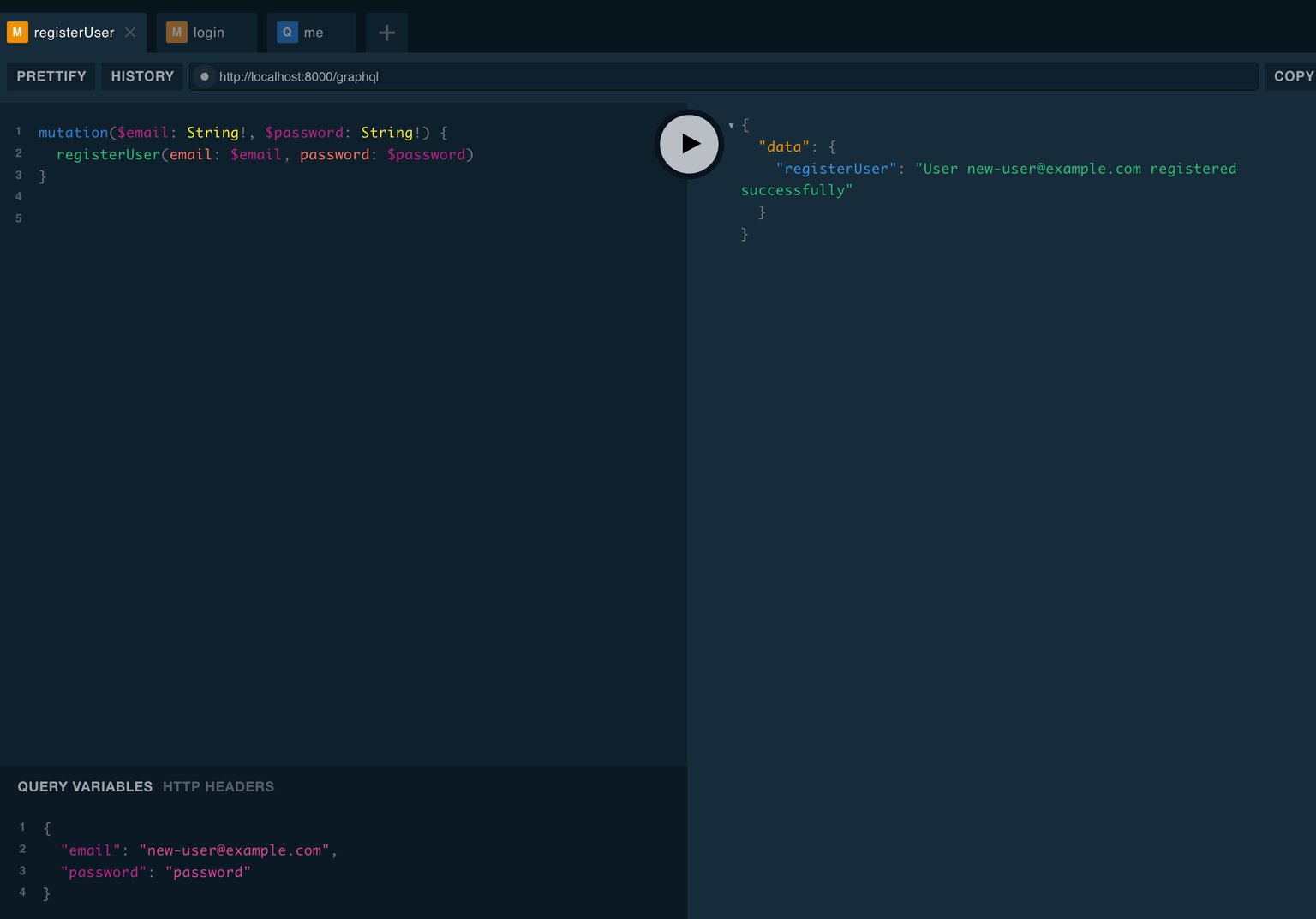
Let's test the registration functionality:
mutation {
  registerUser(email: "alice@example.com", password: "secret")
}
Implementing User Login and Protected Queries
With user registration working, we now need to implement the login functionality and create protected queries that require authentication. This involves using Kratos' self-service login flows and implementing session validation.
Let's add the necessary imports and helper functions to handle authentication:
KRATOS_PUBLIC_URL = "http://localhost:4433"

def get_kratos_session(token):
    headers = {"X-Session-Token": token}
    resp = requests.get(f"{KRATOS_PUBLIC_URL}/sessions/whoami", headers=headers)
    if resp.status_code == 200:
        return resp.json()
    return None
Now we'll create a protected query that demonstrates how to access user information only for authenticated users. The me query will return the current user's email if they have a valid session:
@query.field("me")
def resolve_me(*_):
    token = request.headers.get("X-Session-Token")
    session = get_kratos_session(token)
    if not session:
        return "Unauthorized"
    return session["identity"]["traits"]["email"]
Next, we'll implement the login mutation that initiates a Kratos login flow and returns a session token for authenticated users:
@mutation.field("login")
def resolve_login(_, info, identifier, password):
    flow_resp = requests.get(f"{KRATOS_PUBLIC_URL}/self-service/login/api")
    flow_id = flow_resp.json().get("id")
    submit_resp = requests.post(
        f"{KRATOS_PUBLIC_URL}/self-service/login?flow={flow_id}",
        json={"method": "password", "identifier": identifier, "password": password},
    )
    payload = submit_resp.json()
    token = payload.get("session_token")
    return {"sessionToken": token, "identityEmail": payload.get("identity", {}).get("traits", {}).get("email", "")}
We need to update our GraphQL schema to include the new login mutation and the protected me query. We'll also define a custom response type for the login mutation:
schema = make_executable_schema("""
type Query {
    hello: String!
    me: String!
}
type Mutation {
    registerUser(email: String!, password: String!): String!
    login(identifier: String!, password: String!): LoginResponse!
}
type LoginResponse {
    sessionToken: String!
    identityEmail: String!
}
""", query, mutation)
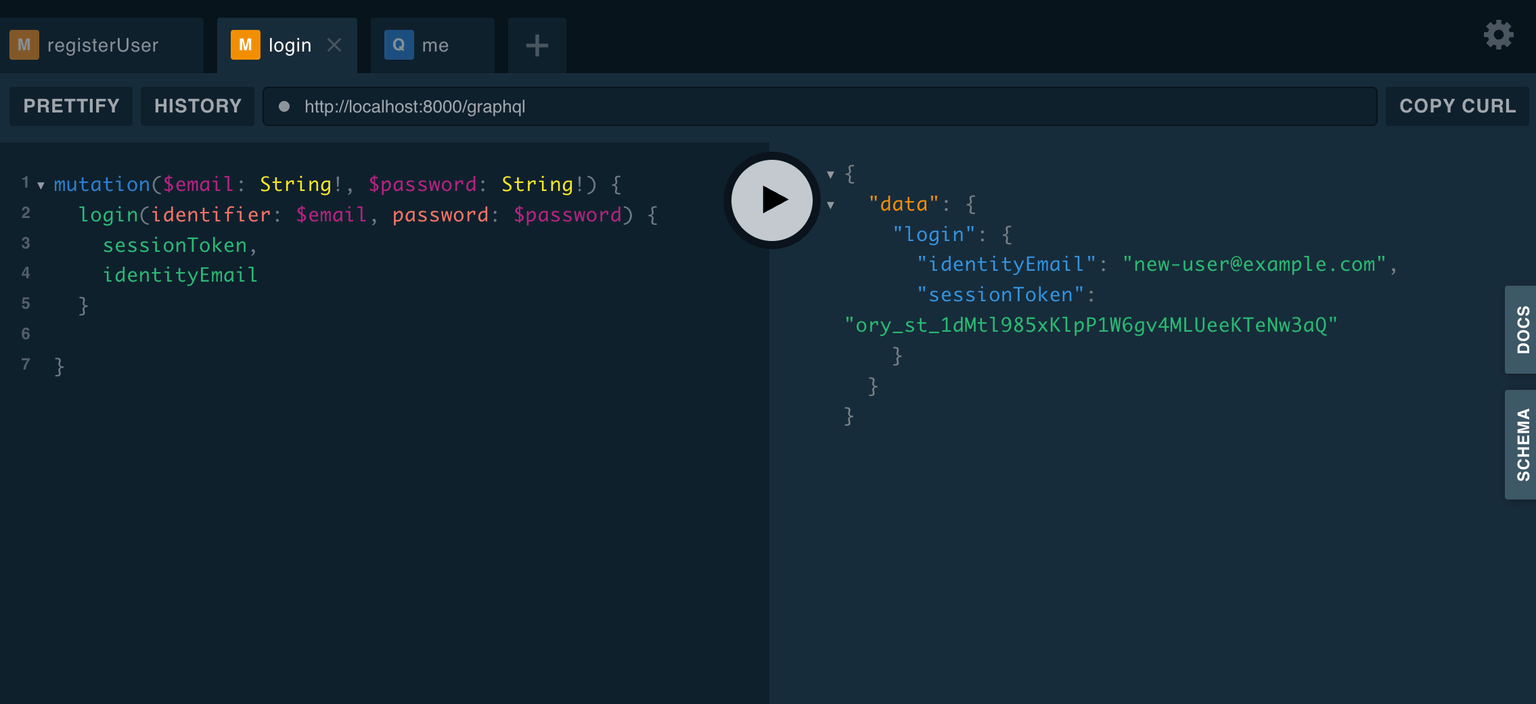
Now you can test the login flow:
mutation {
  login(identifier: "alice@example.com", password: "secret") {
    sessionToken
    identityEmail
  }
}
And access protected resources by including the session token in the X-Session-Token header:
query {
  me
}
Security Considerations
- Always use HTTPS for public endpoints to encrypt data in transit
- Treat
session_tokenas sensitive; store in secure cookies or headers - Consider token expiration and session revocation to minimize security risks
- Don't expose the Kratos admin URL in production; keep it internal
- Implement secure cookie settings with
Secure,HttpOnly, andSameSiteattributes - Use strong secrets and rotate them regularly in production environments
Conclusion
Integrating Ory Kratos with a Flask-based GraphQL API provides a robust and secure authentication mechanism. By leveraging Kratos' self-service flows and session management, you can build scalable and secure user authentication systems.
Remember to follow security best practices, such as using secure cookies, enforcing HTTPS, and implementing token expiry and rotation, to protect your application and its users.
Feel free to explore the Ory Kratos documentation for more detailed information and advanced configurations.
For a complete, runnable example, see the repo: wassimoo/ory-graphql.