AI Agents for Regulated Industries: A Private Bedrock Setup
How regulated companies can run AI agents on Amazon Bedrock with zero data retention, no training on their data, no public internet, and proof for their auditors.
AI Agents for Regulated Industries: A Private Bedrock Setup
The demo went well, and the team wants the agent in production. Then someone asks one question, and everything stops: where does our customer data go?
In an industry where data is tightly regulated, that question comes in three parts. Does the data cross the public internet? Does anyone store it? Will it train someone else's model?
On AWS, Amazon Bedrock can answer no to all three. Most of that is the default. The rest comes down to a few settings, and to a handful of catches that can quietly break the promise if nobody's watching.
This article covers what AWS actually commits to, where the catches are, and six steps that turn "AWS says so" into proof you can show an auditor.
What AWS Actually Promises
Here's what AWS commits to in writing. Each point links to the page that says it:
- Training. Neither AWS nor the third-party model providers use your Bedrock inputs or outputs to train their models, whether those are Amazon's own or third-party ones.source
- Model providers. Your inputs and outputs aren't shared with any model provider.source Each provider's models run in AWS-owned accounts the provider has no access to, so Anthropic, OpenAI and the rest never see your prompts or logs.source
- Storage. By default, Bedrock doesn't store your inputs or outputs, and no operator of the service can access them.source
- Network. Traffic between your resources and AWS services stays on AWS's private network, even when you call a public endpoint. The exceptions are traffic to or from the AWS China Regions and the AWS European Sovereign Cloud Region.source
Notice the "by default" in the storage promise. That's where the catches start.
The Catches
1. Some models require retention. A handful of models on Bedrock need AWS to keep your data for abuse detection. Depending on the model, AWS keeps either all traffic or only flagged requests for up to 30 days, and for some models it may review flagged requests by hand. The retained data stays inside AWS and isn't shared with the provider, but it is stored. The list changes, so check the current one.
2. A default can be changed. Bedrock has a data retention setting. If a developer wants to try one of those newer models, they can switch it to a mode that allows retention, and from then on the promise no longer holds.
3. Cross-region inference can move processing. Inference profiles send requests to other Regions when yours is busy. A geographic profile keeps processing within an area like the EU; a global profile can use any supported Region in the world. For models that retain data, AWS stores the retained copy in the Region that processed the request.
4. Your own setup can store data. Model invocation logging, the Responses API's store option, knowledge bases, and your application's own logs all keep copies of prompts and responses. They're yours, but they still count.
5. Your users aren't on AWS. Traffic from your users and on-prem systems to your AWS account crosses the internet, encrypted with TLS, unless it comes in over a VPN or Direct Connect.
6. Agents decide where data goes. An agent calls tools, and a tool that calls a third-party API sends your customer data to that third party, outside everything Bedrock promises. The model never needs to leak anything for this to happen; the agent just has to pick that tool.
The Target Setup
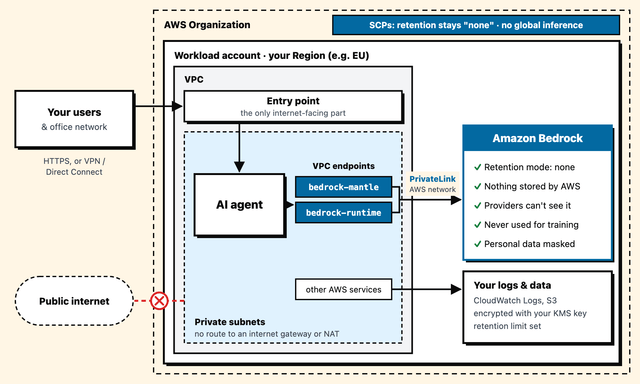
Here's what you end up with once the six steps below are done:
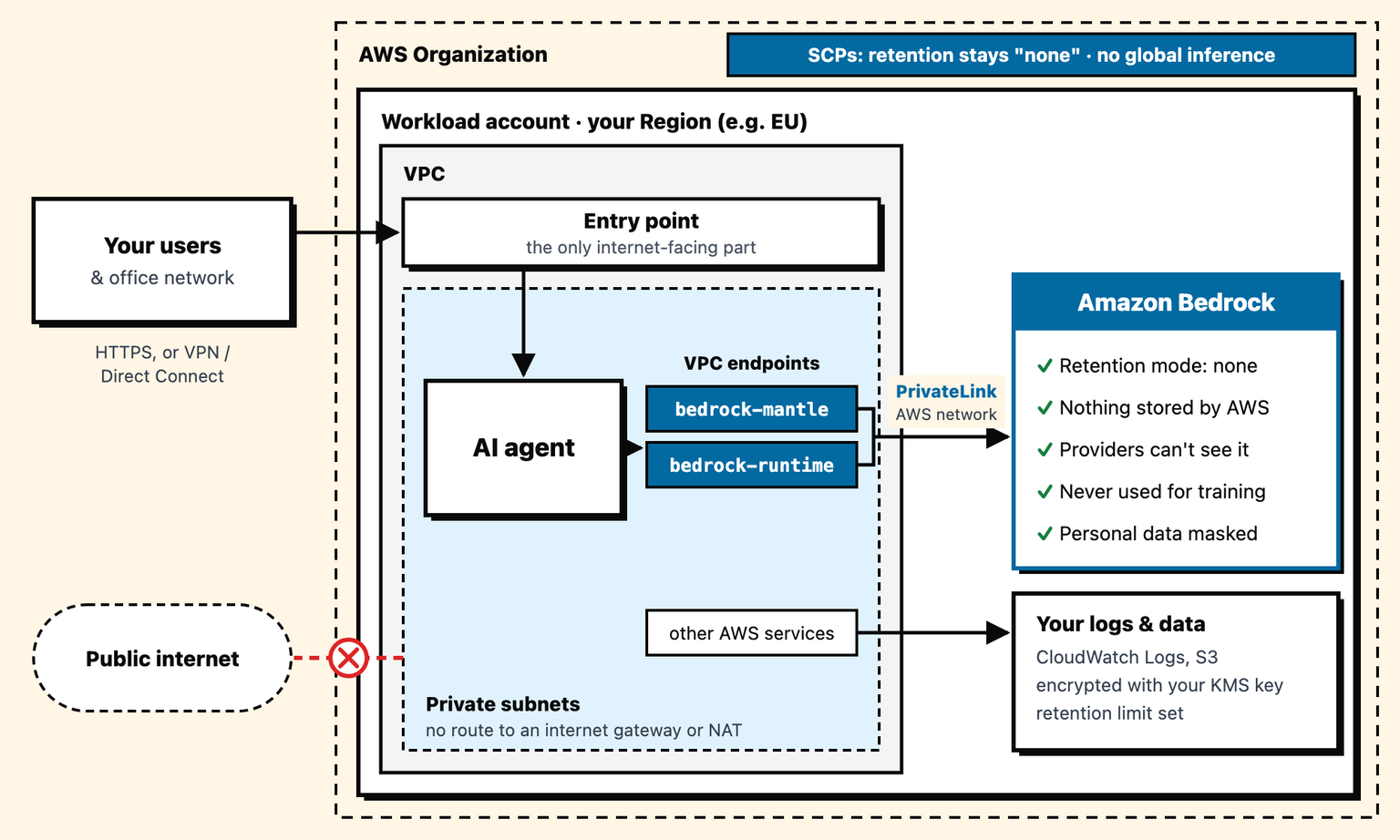
- The agent runs in private subnets with no route to the internet.
- It reaches Bedrock, and every other AWS service it needs, through VPC endpoints. That traffic stays on AWS's network by design, not by routing policy. With no route out, the agent's tools can only reach what you've explicitly connected, which also takes care of catch 6.
- Bedrock's retention mode is
none, and an organization-wide policy stops anyone from changing it. - Models run in your Region or a geography you've approved, and global routing is blocked.
- A guardrail masks personal data the model doesn't need.
- The only copies of prompts and responses are your own logs, encrypted and with a retention limit.
How to Use the Prompts in This Article
You'll probably have an AI coding agent such as Claude Code, Cursor or GitHub Copilot write the infrastructure, so instead of templates, most steps end with a prompt for it. Run each prompt in your infrastructure repository, and the agent will write it in whatever tool you already use: Terraform, CDK or CloudFormation.
The prompts state the requirements and how to check the result, because those are the parts that matter. Review what the agent produces (terraform plan, cdk diff) before applying it. It's still a change to your production network.
Step 1: Turn Off Retention, and Lock It
Set the retention mode to none. In this mode, AWS writes no request or response data to durable storage and shares none with the model provider.source The setting is per Region and there's no console screen for it yet, so run this in every Region you call Bedrock from:
REGION="${AWS_REGION:?set AWS_REGION first}"

# Bedrock Mantle endpoint (Messages, Chat Completions and Responses APIs)
curl -X PUT "https://bedrock-mantle.${REGION}.api.aws/v1/data_retention" \
  -H "x-api-key: $BEDROCK_API_KEY" \
  -H "Content-Type: application/json" \
  -d '{"mode": "none"}'

# bedrock-runtime endpoint (InvokeModel, Converse), set through the control plane
curl -X PUT "https://bedrock.${REGION}.amazonaws.com/data-retention" \
  -H "Authorization: Bearer $AWS_BEARER_TOKEN_BEDROCK" \
  -H "Content-Type: application/json" \
  -d '{"mode": "none"}'
Models that require retention now show up as unavailable instead of quietly storing your data. To check a specific model, ask for its retention status:
MODEL_ID="<the model ID you call>"

curl "https://bedrock-mantle.${REGION}.api.aws/v1/models/${MODEL_ID}" \
  -H "x-api-key: $BEDROCK_API_KEY"
The response has a data_retention block. If allowed_modes includes none, the model is usable with zero retention.
Then make sure nobody can change it. This service control policy (SCP), adapted from AWS's docs, denies any attempt to set a mode other than none anywhere in your AWS organization:
{
  "Version": "2012-10-17",
  "Statement": [
    {
      "Sid": "RequireZeroRetentionMantle",
      "Effect": "Deny",
      "Action": [
        "bedrock-mantle:PutAccountDataRetention",
        "bedrock-mantle:CreateProject",
        "bedrock-mantle:UpdateProject"
      ],
      "Resource": "*",
      "Condition": {
        "StringNotEquals": { "bedrock-mantle:DataRetentionMode": "none" }
      }
    },
    {
      "Sid": "RequireZeroRetentionControlPlane",
      "Effect": "Deny",
      "Action": ["bedrock:PutAccountDataRetention"],
      "Resource": "*",
      "Condition": {
        "StringNotEquals": { "bedrock:DataRetentionMode": "none" }
      }
    }
  ]
}
SCPs don't apply to your organization's management account, so don't run workloads there. Keep Bedrock in member accounts, where the policy holds. And if your organization was created through AWS's new simplified sign-up, AWS manages its SCPs for you: you'll need to activate advanced features before you can add your own, and that can't be undone.
Prompt for your AI agent:
Add an AWS Organizations service control policy to our infrastructure code
using the policy JSON below, and attach it to the organizational unit that
contains our workload accounts.

<paste the policy JSON>

Before you finish:
- Confirm the management account is not in that OU and runs no Bedrock workloads.
- List every account the policy now applies to.
- Show me the plan or diff before anything is applied.
Step 2: Remove the Route to the Internet
AWS already keeps the traffic on its own network. But "AWS routes it privately" is a weaker answer for an auditor than "there is no route to the internet at all", and the second one is easy to build.
The agent runs in private subnets whose route tables have no internet gateway, no NAT and no egress-only gateway for IPv6. It reaches Bedrock through interface VPC endpoints (AWS PrivateLink). With private DNS turned on for the endpoints, Bedrock's usual hostnames resolve to private IPs inside your VPC, so the agent's code doesn't change at all.
Without NAT, every other AWS service the agent uses needs its own endpoint too, and your coding agent can find them for you. The upside is that every service the agent can reach is now listed in your infrastructure code.
Prompt for your AI agent:
Make the network for our AI agent private. Use the IaC tool this repository
already uses, and don't change anything unrelated.

1. Run the agent in private subnets. Their route tables must have no route
   to an internet gateway, NAT gateway or egress-only internet gateway: no
   0.0.0.0/0 and no ::/0.
2. Create interface VPC endpoints with private DNS enabled for
   com.amazonaws.<region>.bedrock-mantle and com.amazonaws.<region>.bedrock-runtime,
   in the agent's subnets.
3. Endpoint policies must allow only the agent's IAM role:
   - bedrock-mantle: the action bedrock-mantle:CreateInference
   - bedrock-runtime: bedrock:InvokeModel and bedrock:InvokeModelWithResponseStream
4. The endpoints' security group accepts HTTPS (443) only from the agent's
   security group.
5. Add an endpoint for every other AWS service the agent needs to start and
   run without NAT. Search the application code and the deployment setup to
   find them, and list what you found.

When you're done, list every route table, endpoint and security group you
created or changed, and show how you confirmed that the agent's subnets have
no route to the internet.
Then check it from inside the VPC. Run this from the agent's subnets:
# Should print private 10.x addresses, not public ones
getent hosts "bedrock-mantle.${AWS_REGION}.api.aws"

# Should fail: there's no route to the internet
curl -sS -m 5 https://example.com > /dev/null && echo "LEAK: internet egress is open"
Step 3: Keep Processing Where Your Data Is Allowed
Regulators care where data is processed, not only where it's stored. Bedrock gives you three options for each model:
- In-Region: the request is processed in the Region you call.
- Geographic: Bedrock may route the request to other Regions in one geography, such as the EU. These profile IDs start with
eu.,us.and so on. - Global: the request can be processed in any supported commercial Region in the world. These profile IDs start with
global..
Availability differs per model, so check before you design around it. A model may run In-Region in only one or two European Regions, and everywhere else you reach it through its eu. profile.
For a regulated workload, the details of that geographic profile matter:
- Where it goes depends on where you call it from. A model's
eu.profile can route only between EU Regions when called from Frankfurt or Paris, but add London when called from London, or Zurich when called from Zurich. If your rule is "EU member states only", call it from an EU Region. Call GetInferenceProfile from your source Region to get the exact list, and keep the output with your evidence. - That list won't change under you. AWS never changes a geographic profile's destination Regions: when it adds Regions, it creates a new profile instead.source The list you approve stays the list.
- Your Region restrictions must include every destination. If an SCP only allows your home Region, calls through a geographic profile will fail. Allow every destination Region in the profile.
Then block global profiles with an SCP, so nobody switches to one to get more capacity.
If you're in the AWS European Sovereign Cloud, note that it's one of the exceptions to AWS's "stays on our network" rule. That makes the private network from Step 2 more important there, not less.
Prompt for your AI agent:
Write a service control policy for our workload accounts that denies Amazon
Bedrock inference through global cross-region inference profiles (IDs that
start with "global.") but still allows in-Region model calls and EU
geographic profiles (IDs that start with "eu.").

Base it on AWS's guidance here:
https://aws.amazon.com/blogs/machine-learning/securing-amazon-bedrock-cross-region-inference-geographic-and-global/
It matches global requests with aws:RequestedRegion "unspecified" together
with bedrock:InferenceProfileArn matching the global.* profile ARNs. Do not
add "unspecified" to any Region deny list.

Check every action, condition key and ARN format against the current AWS
documentation, and tell me where each one is documented. If we already have
an SCP that restricts Regions, make sure it allows every destination Region
of the eu. profiles we use. Then write a test for our sandbox account: a
request using a global profile must be denied, and a request using an eu.
profile must succeed.
Step 4: Send the Model Only the Personal Data It Needs
The setup so far controls where data goes. Data minimization, a core GDPR principle and the idea behind HIPAA's "minimum necessary" standard, asks a different question: does the model need to see that customer's name, IBAN or health number at all? Usually it doesn't.
Bedrock Guardrails can check prompts and responses for personal data, then either block the request or mask the data, replacing it with its type, such as {NAME} or {EMAIL}. The built-in types include names, addresses, email addresses, phone numbers, card numbers, IBANs, SWIFT codes and UK NHS numbers. For your own identifiers, such as customer or policy numbers, you add regular expressions.
Three limits matter for agents:
- It's detection, not a guarantee. The filter is a machine learning model that judges by context. Treat it as a safety net on top of your other controls.
- It doesn't check tool calls. The filter evaluates text only. It doesn't look at the arguments the model passes to your tools, the results your tools send back, or the tool definitions. In an agent, that's where much of the customer data flows, so redact in your tool code before results go back to the model.
- Masking doesn't reach your logs. Model invocation logs always contain the original, unmasked prompt, and the guardrail's trace output contains the original values by design. Step 5 covers how to handle both.
If you turn on cross-Region inference for the guardrail itself, choose a guardrail profile whose destination Regions match the rules from Step 3.
Prompt for your AI agent:
Add an Amazon Bedrock guardrail to our AI agent that masks personal data in
model inputs and outputs. Use the IaC tool this repository already uses.

1. Create the guardrail with sensitive information filters in mask mode for
   these PII types: <list the types your data contains, e.g. NAME, EMAIL,
   PHONE, ADDRESS, INTERNATIONAL_BANK_ACCOUNT_NUMBER>. Add regex filters for
   our own identifiers: <e.g. customer IDs like CUS-\d{8}>.
2. Encrypt the guardrail with our customer-managed KMS key.
3. Apply the guardrail to every model call the agent makes. Check that
   guardrails are supported on the Bedrock API and endpoint our code uses.
4. Update the agent's IAM role and the VPC endpoint policies from our
   private network setup with the permissions guardrails need, checked
   against the AWS documentation.
5. Find every tool the agent can call. List the personal data each one
   receives from the model and returns to it, since the guardrail doesn't
   check tool inputs or outputs, and propose where to redact it.

Don't log the guardrail's trace output unredacted: it contains the original
values. Show me the plan or diff before anything is applied.
Step 5: Control What You Store Yourself
With retention at none, AWS stores nothing. Your own account is a different matter:
- Model invocation logging is off by default. If you turn it on for debugging or audit, it writes full prompts and responses to your S3 bucket or CloudWatch Logs, unmasked even when a guardrail masked them. Encrypt them with your own KMS key, set a retention period, restrict who can read them, and consider CloudWatch Logs data protection to mask personal data in log groups.
- The Responses API's
storeoption keeps responses for later retrieval. Undernone, requests withstore=trueare rejected, which is what you want. - Your application's logs and traces contain the same prompts and tool results. Give them a retention limit and redact what you don't need.
- Knowledge bases and vector stores hold your documents and their embeddings in your account. Encrypt them like any other data store.
Prompt for your AI agent:
Find every place in this codebase and its infrastructure where model prompts,
model responses or tool results can be stored. Include application logs,
tracing, error reporting, Bedrock model invocation logging, S3 buckets,
CloudWatch log groups, databases and vector stores.

For each one, report: what is stored, where, whether it's encrypted with a
customer-managed KMS key, its retention period, and who can read it. Include
guardrail trace output if we log it. Flag anything with no retention limit,
no encryption, broad read access, unmasked personal data, or that sends data
to a service outside our AWS account. Don't change anything yet; I'll review
the report first.
Step 6: Prove It
Configuration drifts, so turn each promise into evidence you can check:
- Retention. Alert on any attempt to change the retention setting. With the SCP in place, every attempt should be denied, and an attempt still tells you someone tried.
- Network. Turn on VPC Flow Logs for the agent's subnets. They should show no traffic to public IP addresses.
- Routes. Run a recurring check that the agent's route tables have no
0.0.0.0/0or::/0route.
Then keep the evidence in one place, next to the question each piece answers:
| Question | Evidence |
|---|---|
| Is our data used to train models? | The AWS quotes above, and the AWS Service Terms |
| Does AWS store it? | Retention mode none in every Region, the SCP that locks it, and the alerts on changes |
| Does it cross the public internet? | Route tables with no internet route, the VPC endpoint configuration, and a flow log sample |
| Where is it processed? | The model IDs you call, the GetInferenceProfile output, and the SCP that blocks global profiles |
| Who can use the model? | The endpoint policies and the agent's IAM role |
| Is personal data minimized? | The guardrail configuration, and the redaction in your tool code |
| What do we keep ourselves? | The storage report from Step 5, with encryption and retention for each item |
Kept up to date, that table answers every question with something checkable instead of a promise.
Prompt for your AI agent:
Add monitoring to our infrastructure code that proves our Bedrock setup stays
private:

1. Alert the security team (via our existing SNS topic or alerting channel)
   on any CloudTrail event named PutAccountDataRetention, from Bedrock's
   control plane or the Bedrock Mantle API. Check CloudTrail's documentation
   for the exact event source names; don't guess them.
2. Turn on VPC Flow Logs for the agent's subnets, delivered to an encrypted S3
   bucket with a 90-day retention period.
3. Add an AWS Config rule, or a scheduled check, that fails if any route
   table attached to the agent's subnets has a 0.0.0.0/0 or ::/0 route.

Explain how I can trigger each alert once in our sandbox account to confirm
it works.
When This Isn't Enough
Two situations need more than this setup. First, if the data legally can't leave your own premises, any cloud service is ruled out, and you're looking at self-hosted models on your own hardware. Second, if you need one of the models that requires retention, the question is whether AWS keeping data for up to 30 days, inside AWS, is acceptable to your legal team.
Some organizations can get zero-retention access to those models anyway. AWS evaluates it per account and per model through your AWS account team, and for some models, eligibility is managed by the model provider.source There's also an Enterprise Frontier Safeguards program that gives eligible customers zero retention for some of these models, but only until December 31, 2026.source After that, their traffic is retained again, so don't build a compliance case on it.
The Checklist
- Retention is set to
nonein every Region you use, on both the Mantle and runtime endpoints. - An SCP blocks any other retention mode, and no workloads run in the management account.
- Every model you use lists
nonein its allowed retention modes. - The agent's subnets have no
0.0.0.0/0or::/0route to an internet gateway, NAT or egress-only gateway. - Bedrock is reached through VPC endpoints with private DNS, and the endpoint policies allow only the agent's role.
- Endpoints exist for every other AWS service the agent needs.
- Models run In-Region or through a geographic profile whose destination Regions you've checked and kept on file, and global profiles are blocked.
- A guardrail masks the personal data the model doesn't need, and your tool code redacts what the guardrail can't see.
- Invocation logs, app logs and vector stores are encrypted, access-controlled and have a retention limit.
- Retention changes trigger an alert, and VPC Flow Logs show no public traffic.
- The evidence table is filled in and up to date.
Conclusion
In a regulated industry, private AI on AWS isn't a different product. It's Bedrock with a handful of deliberate settings: retention off and locked, no route to the internet, processing kept where your data is allowed, personal data masked before the model sees it, and your own logs under control. Each one is a few lines of configuration or a single prompt to your coding agent, and together they give your security and compliance teams more than a vendor's promise: evidence they can check themselves.
If you work in a regulated industry and want AI agents on AWS that your security and compliance teams will sign off on, message me on LinkedIn.